
Apple Just Added A Powerful Anti-Scam Tool To iPhones — Here’s How To Activate It
 |
| This iOS 26 feature is a free service that can help stop robocallers being able to ring you up |
Spammers who constantly call and claim to know us are a daily distraction for too many of us. Unwanted calls from telemarketers and people pretending to be government officials or bank agents are the top consumer complaint, according to the Federal Communications Commission.
But there is a new free call screening tool that can help us reclaim our wasted time.
As part of Apple’s iOS 26 software update, released last month, there is a new call screening feature for unknown callers.
The primary advantage of enabling the “Ask Reason for Calling” setting is that it will prevent the time-consuming “Who is this?” back-and-forth conversations.
Once you activate the iOS call screener, Apple’s Siri will become your phone’s bouncer and in its robotic voice, it will ask your caller who is calling and the reason for the call.
The transcribed conversation will appear as a message and you can direct Siri to ask more questions, pick up the phone or reject the call.
But this feature is not a default setting ― you need to turn it on yourself if you’re an iPhone user. Here’s how.
How To Turn On iOS 26′s Call Screening Feature
To access this feature, you first need to update your phone to the latest iOS 26 software, available under the General menu after tapping “Software Update.”
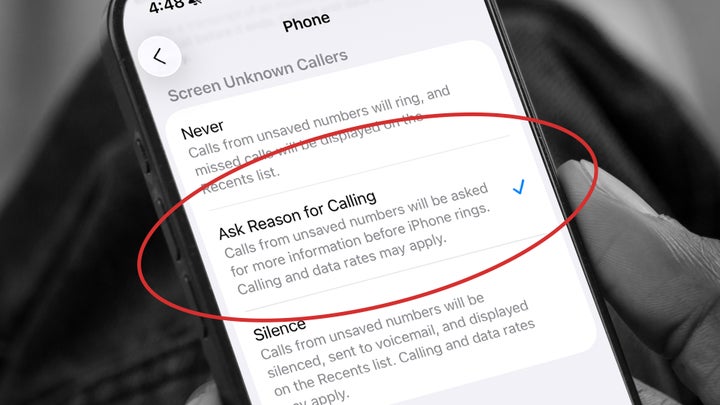
After that, select Settings, then Apps on your iPhone. You should then tap Phone and scroll down to the section “Screen Unknown Callers.”
Here is where you can select from three options:
If you choose “Never,” call screening is turned off and your iPhone will ring when unknown numbers call you.
If you select “Ask Reason for Calling,” calls from unknown numbers will require you to answer questions from Siri before your iPhone rings.
If you select “Silence,” calls from unsaved numbers will be silenced, sent to voicemail, and appear in your phone’s Recents list so you can review the transcribed voicemail at your convenience.
This kind of call screening feature might be familiar to Android users. Google’s Pixel phones already have access to a call screening feature.
Under Google’s “Call Screen” feature, Google Assistant will automatically tell a caller that you’re using a screening service, and will require them to state a reason for calling before they can reach you.
Before Apple introduced its new feature, iPhone users might have needed to download a third-party app. The big advantage of the iOS update is that call screening is now built into the device, allowing you to choose the degree to which someone can have easy access to you.
“Ask Reason For Calling” is a good middle ground for people who don’t want to send all calls from all unknown numbers to voicemail.
This way, an unsaved number like your doctor’s office can reach you about a recent visit, but a scammer pretending to be your bank might be more likely to give up and try an easier target.


COMMENTS